Castor puts 110 file tools in one window, on macOS and Windows: for PDFs, images, video and audio, and for every chore you would otherwise hand to a website you have never heard of. Here, nothing leaves your computer.
Version 0.9.0 (beta) · Open source, on GitHub · GPL-3.0 · No account, no telemetry
1.Every tool
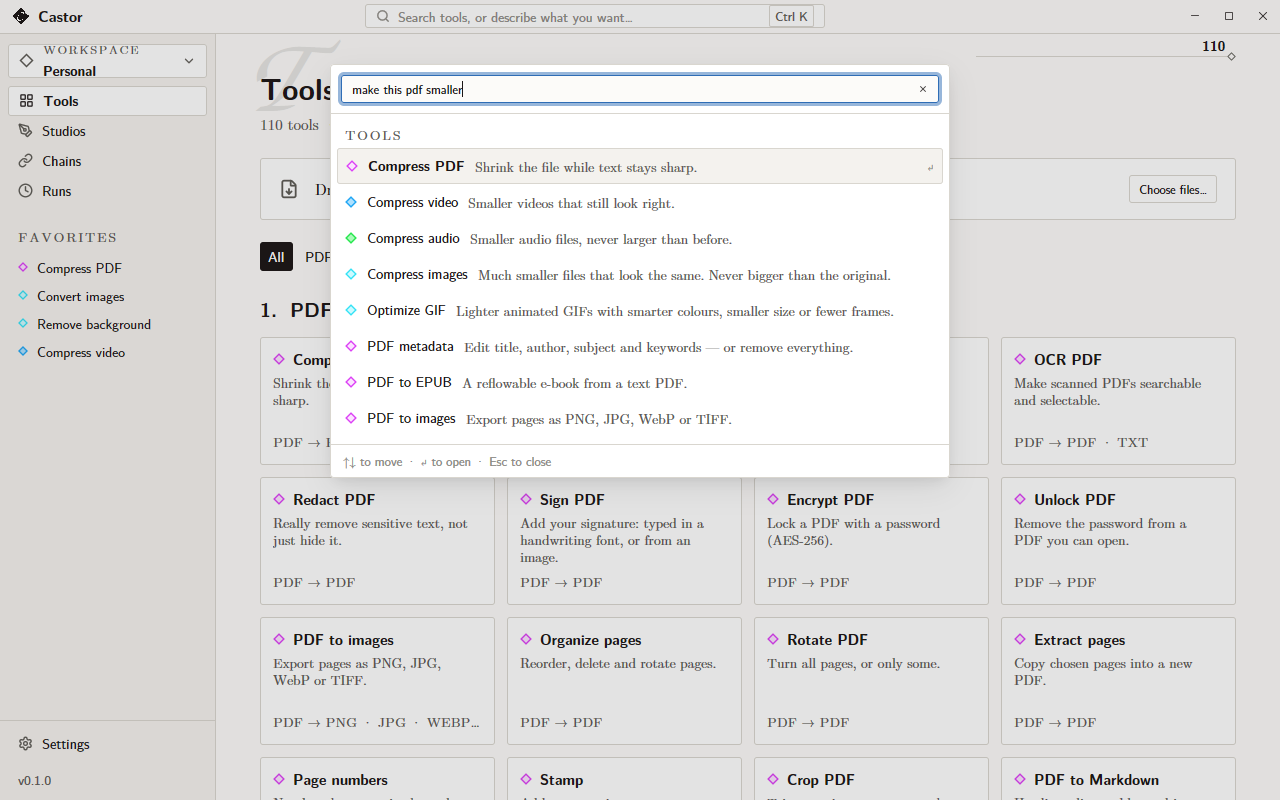
Six families, 110 tools, each with plain options, a live preview where it helps, and batches of hundreds of files. Search them in your own words: the app’s ⌘K palette (Ctrl K on Windows) does the same in nine languages.
1.1PDF28 tools
- Compress PDFShrink the file while text stays sharp.
- Merge PDFCombine files into one PDF, in queue order.
- Split PDFCut a PDF into several files.
- OCR PDFMake scanned PDFs searchable and selectable.
- Redact PDFReally remove sensitive text, not just hide it.
- Sign PDFAdd your signature: typed in a handwriting font, or from an image.
- Encrypt PDFLock a PDF with a password (AES-256).
- Unlock PDFRemove the password from a PDF you can open.
- PDF to imagesExport pages as PNG, JPG, WebP or TIFF.
- Organize pagesReorder, delete and rotate pages.
- Rotate PDFTurn all pages, or only some.
- Extract pagesCopy chosen pages into a new PDF.
- Crop PDFTrim margins, or cut away the white around the content.
- Attach to eachAdd a cover or terms PDF to every file.
- Page numbersNumber the pages, in the style you like.
- StampAdd a text or image stamp or watermark.
- PDF to MarkdownHeadings, lists, tables and images, as clean Markdown.
- PDF to EPUBA reflowable e-book from a text PDF.
- E-book to PDFEPUB, MOBI, FB2, CBZ, HTML or TXT to a printable PDF.
- Office to PDFWord, Excel, PowerPoint and OpenDocument to PDF, with LibreOffice.
- Flatten PDFBake form fields and comments into the page.
- Repair PDFRebuild a damaged PDF so it opens everywhere.
- PDF metadataEdit title, author, subject and keywords — or remove everything.
- Grayscale PDFTurn colours into grays, for cheaper printing.
- Compare PDFsHighlight what changed between two versions.
- Fill PDF formFill form fields from a CSV or JSON file, or list them.
- Markdown to PDFTypeset Markdown in a classic, book-like style — LaTeX formulas included.
- Extract imagesSave every picture of a PDF at full resolution.
1.2Image25 tools
- Remove backgroundCut out the subject with a local model, hair and small details included.
- AI upscaleEnlarge 2×, 3× or 4× with a local super-resolution model: sharp, not blurry.
- Convert imagesHEIC, RAW, SVG, AVIF and more to JPG, PNG, WebP, AVIF, GIF…
- Vectorize imageTrace logos, drawings and photos into scalable SVG.
- Compress imagesMuch smaller files that look the same. Never bigger than the original.
- Colour paletteThe dominant colours of an image, as swatches and palette files.
- Resize imagesExact sizes for social networks, shops and screens, sharp and quick.
- Crop imageCrop to a ratio, cut margins, or trim plain borders automatically.
- Rotate & flipTurn, mirror or straighten images; fix sideways phone photos.
- Strip metadataRemove location, camera and personal data without touching the pixels.
- SEO imageSearch-friendly file names plus title, alt text and keywords written into the image.
- Redact imageBlur faces, text and areas you choose; metadata is removed too.
- WatermarkAdd your name or logo, in a corner or tiled across the image.
- Beautify shotPut screenshots on a painted background with shadow, corners and a window frame.
- Icon packEvery icon size from one image: favicon, ICO, ICNS, iOS and Android.
- Contact sheetMany images on one page: a grid with captions, as PDF or PNG.
- Image comparisonBefore / after as an interactive slider page, an animated GIF or side by side.
- StylizeFilm, vintage, noir, duotone, halftone, sketch and more.
- Find duplicate imagesSpot identical and near-identical pictures, even resized or recompressed.
- Optimize GIFLighter animated GIFs with smarter colours, smaller size or fewer frames.
- Optimize SVGSmaller SVG files: editor data, comments and extra digits removed.
- Colour-blind checkSee your image as people with colour vision deficiencies do, with a contrast report.
- Images to PDFPut images into one PDF, one per page.
- Scan to PDFTurn a photo of a page into a clean, searchable PDF.
- Extract textRead the text in images (OCR), to TXT or Markdown.
1.3Video19 tools
- Trim videoKeep only the part you need.
- Convert videoMP4, MOV, MKV, WebM, AVI or GIF — without quality loss when possible.
- Extract audioThe soundtrack as an audio file, untouched when possible.
- Video to GIFAnimated GIFs with clean colours.
- Compress videoSmaller videos that still look right.
- Split videoEqual parts, fixed lengths or scene changes.
- Resize video1080p, 720p, exact size or percentage.
- Crop video9:16, 1:1, 4:5… or remove black bars.
- Rotate videoTurn or flip, losslessly when possible.
- Change speedFaster or slower, from 0.25× to 4×.
- Mute videoRemove the sound, keep the picture untouched.
- Join videosOne video from many, in queue order.
- Insert clipsIntro, a clip at the first pause, outro.
- Watermark videoA logo or a line of text, where you want it.
- Caption videoCaptions from speech or a subtitle file, in style.
- Add audioReplace the sound or mix in music.
- Extract framesStills, thumbnails or a contact sheet.
- Cut silencesRemove pauses automatically, sound and picture in sync.
- Stabilize videoSteadier handheld footage.
1.4Audio9 tools
- TranscribeSpeech to text, subtitles or documents, offline.
- Merge audioOne after another, or layered.
- Convert audioMP3, M4A, WAV, FLAC, OGG, Opus, AIFF — bit depth kept.
- Compress audioSmaller audio files, never larger than before.
- Trim audioKeep only the part you need.
- Split audioAt pauses, by length or in equal parts.
- Audio speedFaster or slower, pitch kept or shifted.
- Volume & normalizeEven loudness for podcasts, streaming or broadcast.
- DenoiseLess hiss, hum and background noise.
1.5Create20 tools
- QR codeLinks, Wi-Fi, contacts and events as stylish QR codes and printable cards — always checked to scan.
- BarcodeEAN, UPC, Code 128, Data Matrix, PDF417 and more, print-ready and checked by a scanner.
- PlaceholdersPlaceholder images of any size, or a whole set at once, with the dimensions written on them.
- FaviconA complete favicon pack — ICO, SVG, Apple and Android icons, manifest — from a letter, an emoji or a logo.
- GradientsSoft mesh gradients with grain and light, as images of any size or seamless looping videos.
- Social cardOpen Graph and social images from a title and a logo — or one per row of a CSV.
- Data mergeA spreadsheet and a layout become certificates, badges, labels or letters — one PDF per row or all in one.
- HTML to imageScreenshots of web pages, HTML files or pasted HTML — full page, sharp at 2× or 3×.
- HTML to PDFPrint web pages, HTML files or pasted HTML to PDF, with your paper size, margins and page numbers.
- Video downloaderSave videos or their audio from the links you paste, in the quality you choose.
- FontsSpecimen sheets, glyph grids and font info; convert between TTF, OTF, WOFF and WOFF2.
- ShadersGenerative backgrounds — silk, waves, aurora, contour lines — as images or seamless loops.
- Pattern & textureSeamless geometric patterns — diamonds, dots, terrazzo, hexagons… — as a tile or a full background.
- Watermark tileA repeating, semi-transparent text watermark (“Confidential”, “Draft”, © name) to lay over anything.
- FormulaBeautifully typeset maths from LaTeX or Typst, as SVG, PNG or PDF.
- Brand sheetA one-page brand sheet from your logo, colours and fonts — values, specimens and contrast checks included.
- CarouselMulti-slide social carousels from a few text blocks and images, in one consistent template.
- Device mockupPut a screenshot or a screen recording into a phone, laptop or browser window on a styled scene.
- AudiogramTurn a podcast or voice clip into a video for social media — animated waveform, title, cover and captions.
- MotionLower thirds, text reveals, logo stings and title cards as short clips with a transparent background.
1.6Files9 tools
- Batch renameRename many files at once with patterns, numbers, dates and find & replace — previewed, undoable.
- Create archiveZIP, 7z or TAR archives, with an optional AES-256 password, exclusions and split volumes.
- Extract archiveOpen ZIP, 7z and TAR archives (also password-protected and split), safely, into a folder.
- Change file datesSet created and modified dates to the photo’s capture date, to a date of your choice, or shift them.
- Sort & routeTidy files into folders by type, year, month, camera, size or your own rules — every move undoable.
- Find duplicatesFind identical files byte for byte, see how much space they waste, set the copies aside — never deleted.
- What is this file?Find the real type of files with no or wrong extensions — 200+ types, with confidence — and fix them.
- MetadataSee, edit or remove the hidden information in PDFs, photos, music and videos.
- ChecksumsSHA-256 fingerprints to prove a file arrived intact.
2.Calm, fast, local
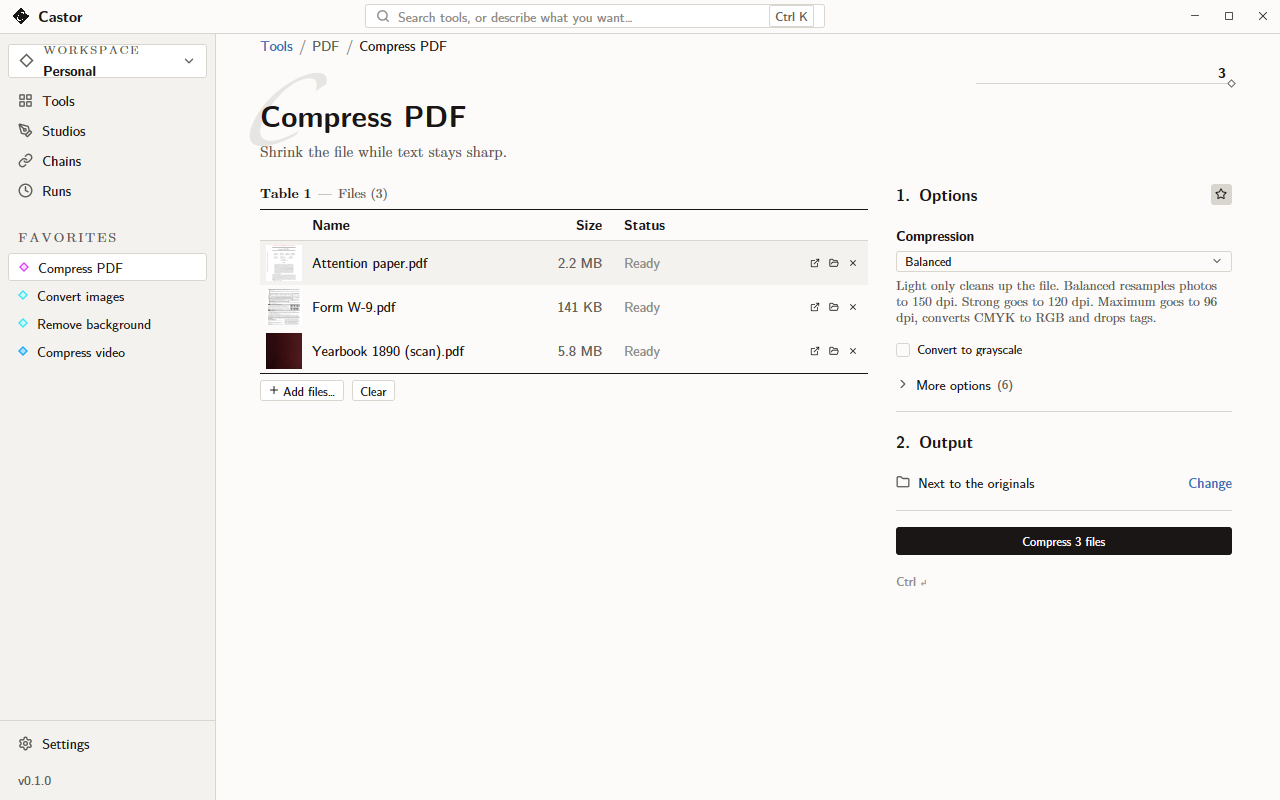
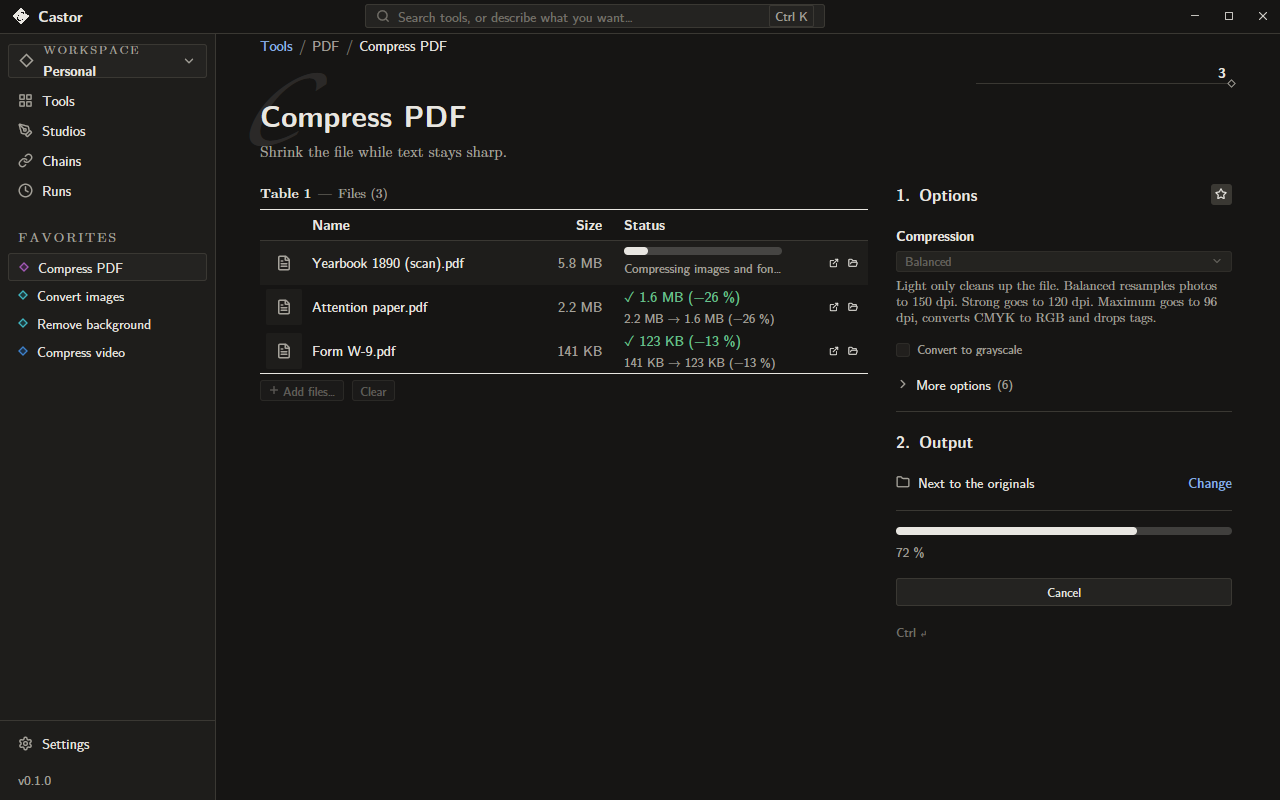
Castor looks like a well-set document that happens to be an app: paper, ink, numbered sections, thin rules. It follows your system in light or dark, and it stays out of the way.
- LocalEvery tool runs on your computer: no upload, no account, no telemetry. Only the tools whose job it is go online, like the video downloader. A few tools need a model or a helper (background removal, upscaling, transcription): Castor names it, gives its size and asks first, then downloads it once. After that, it works offline.
- FastA native app written in Rust. Tools run in parallel on batches of hundreds of files, show their progress, and can be cancelled at any time. The PDF, image and audio compressors never give back a file bigger than the original.
- Careful with your filesResults are written next to the originals, or in a folder you choose, under a new name: an existing file is never overwritten. Tools that change files in place (rename, dates, sort) can be undone.
- YoursFree software under the GPL-3.0: no licence key, no trial, no subscription. Read the code, build it, change it. Nine languages, and one window that works the same on macOS and Windows.
3.Chains, runs, menu bar
Single tools are only the start. Castor remembers what you do, lets you string tools together, and is there when the main window is not.
3.1Chains
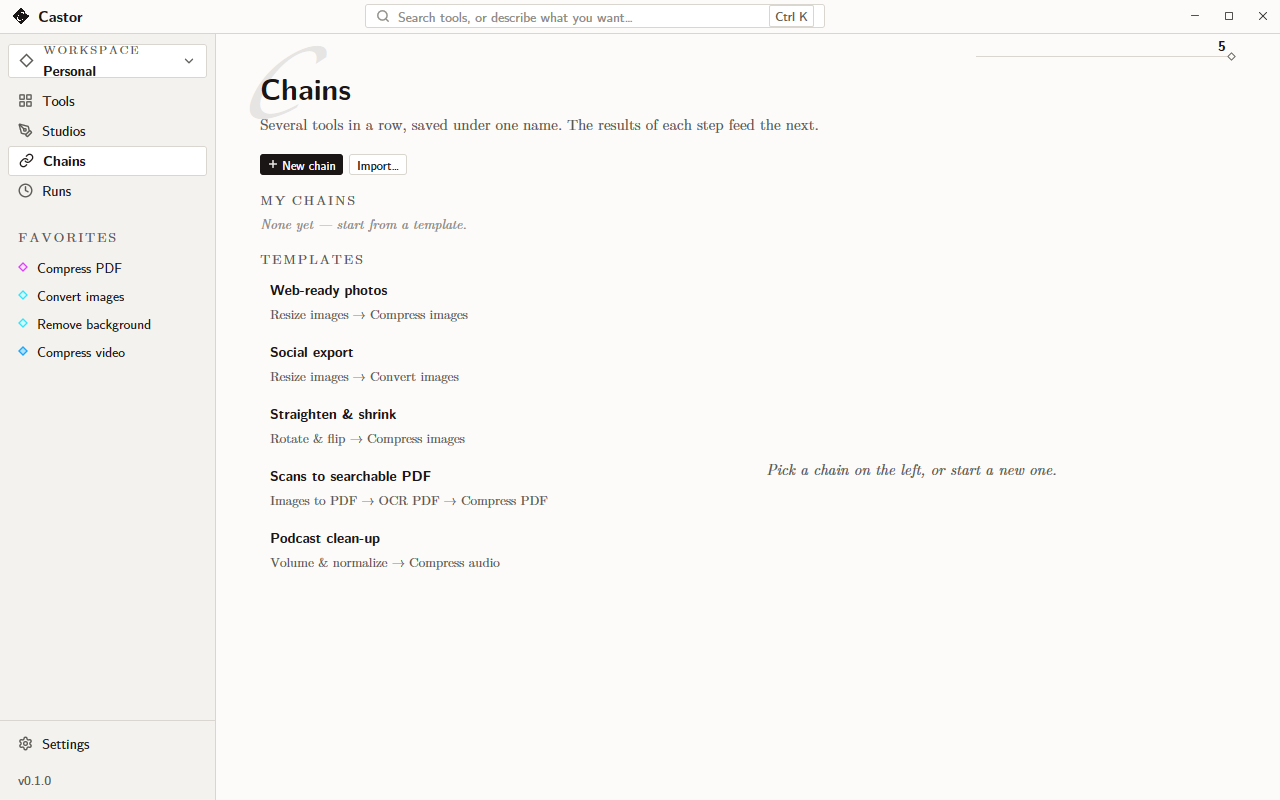
Save several tools in a row under one name, such as Resize images → Compress images, and run them on files or a whole folder: the results of each step feed the next. Templates get you started (web-ready photos, scans to searchable PDF, podcast clean-up), and chains export to a small TOML file you can share.
3.2Runs, with undo
Every run is listed by day: the tool or chain, the files, the size before and after, the time it took. Open the results again, run once more with the same settings, or undo a rename, a sort or a change of dates in one click.
3.3Menu bar and tray
Click the diamond in the menu bar (the system tray on Windows), or press ⌘ ⌥ Space or Ctrl Alt Space from anywhere. Drop files on the panel and it offers the best tools for them, which run right away with your last settings. When the clipboard holds an image, compress it, cut out its background or turn it into a JPG, and the result goes back to the clipboard.

3.4Terminal and AI agents
Every tool also works from the terminal with castor-cli, with the same options and the same history as the app. And Castor ships an MCP server, so an AI assistant such as Claude can list the tools, read their options and run them on your files, without uploading anything.
Terminal
# every tool, its options, and a run
$ castor-cli list --family pdf
$ castor-cli info pdf.compress
$ castor-cli run pdf.compress report.pdf --set preset=strong --out ~/Desktop
$ castor-cli search make this pdf smaller
$ castor-cli chain web-photos.toml ~/Pictures/trip
MCP, in Claude Code
$ claude mcp add castor -- /Applications/Castor.app/Contents/MacOS/castor-mcp
# then: “Make a Wi-Fi QR code card for the studio, as a PDF on my desktop.”4.Castor and Hangar
Castor exists because Hangar showed the way: one calm, offline app for every file on your desk, with chains and a menu bar. Hangar is a polished commercial app, sold once, with studios and support behind it. Castor is the free cousin: open source, with a command line and an MCP server. Pick whichever suits you; here are the facts.
| Feature | Castor | Hangar |
|---|---|---|
| Price | Free | One-time licence: $45 (1 device), $99 (3), $239 (10), at launch prices; 3-day free trial |
| Licence | GPL-3.0, source on GitHub | Proprietary |
| Platforms | macOS, Windows | macOS, Windows |
| Tools | 110 | 89 in the catalogue, of which 12 marked “Soon” |
| Works offline | Yes | Yes |
| Menu bar | Yes, with clipboard actions and a global shortcut | Yes |
| Chains | Yes | Yes |
| Command line | Yes, castor-cli | Not advertised |
| MCP server | Yes | On its roadmap |
| Account | None | None; a licence key after the trial |
Hangar’s figures as published on hangar.tools on 6 November 2026. “Not advertised” means the website doesn’t mention it, not that the app can’t do it. Hangar is a trademark of its owner; Castor is an independent project, not affiliated with it.
5.Download
Free
No account, no trial, no licence key. Updates included, on as many computers as you like.
| System | Version | Download |
|---|---|---|
| macOS, Apple Silicon (M1 and later) | macOS 13.4 Ventura or later | Disk image (.dmg) |
| macOS, Intel | macOS 11 Big Sur or later | Disk image (.dmg) |
| Windows, 64-bit (x64) | Windows 10 (version 2004 or later) or 11 | Installer (Setup.exe) |
- Windows. The installer isn’t code-signed yet, so SmartScreen may warn you the first time: click More info, then Run anyway.
- macOS. Open the disk image and drag Castor into Applications. Homebrew users, once the tap is live:
brew install --cask basedpolymer/tap/castor. - Updates. Castor can check GitHub for new versions and update itself (Settings → Updates).
- Source. github.com/basedpolymer/castor · Changelog · Licence (GPL-3.0-or-later)