Skip to content
Fouine

Search inside every document on your Mac. Scans included.

Fouine reads every document in the folders you point it at and indexes the text page by page, photocopies included. Type a few words: you get the passage, the page number, and a preview already open at that page.

Buy Fouine · €39

Try it free for 30 days

macOS 13 or later · Intel and Apple Silicon · Your documents and your searches stay on your Mac.

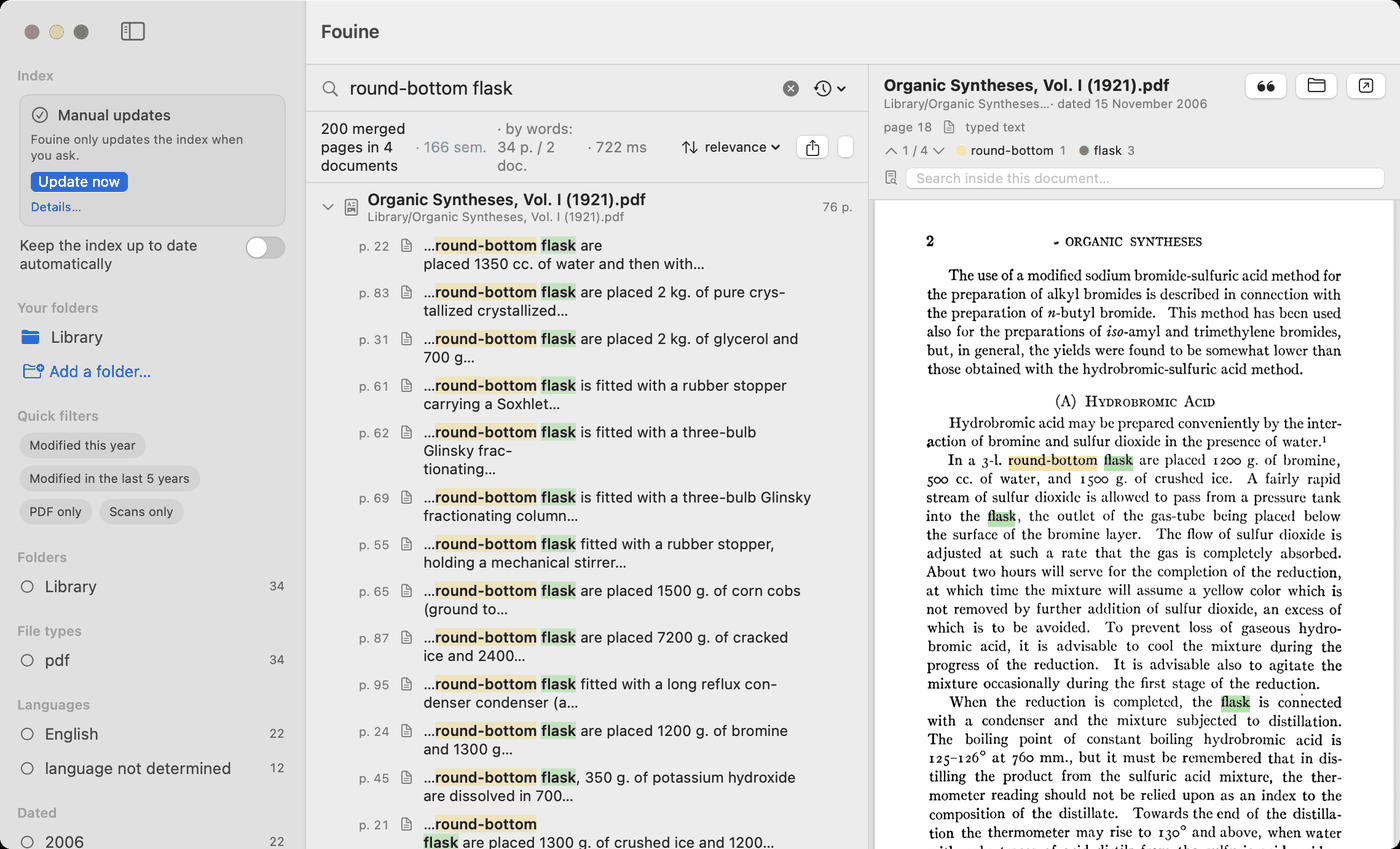
The Fouine window. On the left, a sidebar with the Index card reading “Manual updates” and an “Update now” button, the indexed folder, and filters by file type and language. In the middle, the search “round-bottom flask” and its results, one line per page, with the page number and the words picked out in colour. On the right, page 18 of “Organic Syntheses, Vol. I (1921).pdf”, open and highlighted at the match.
One search, one result per page, and the document already open at page 18.

What Fouine does

The page, opened where the words are

A result is a passage and a page number. Click it and the preview opens at that page, with your words picked out in colour. You never reopen a 900-page book at page 1 again.

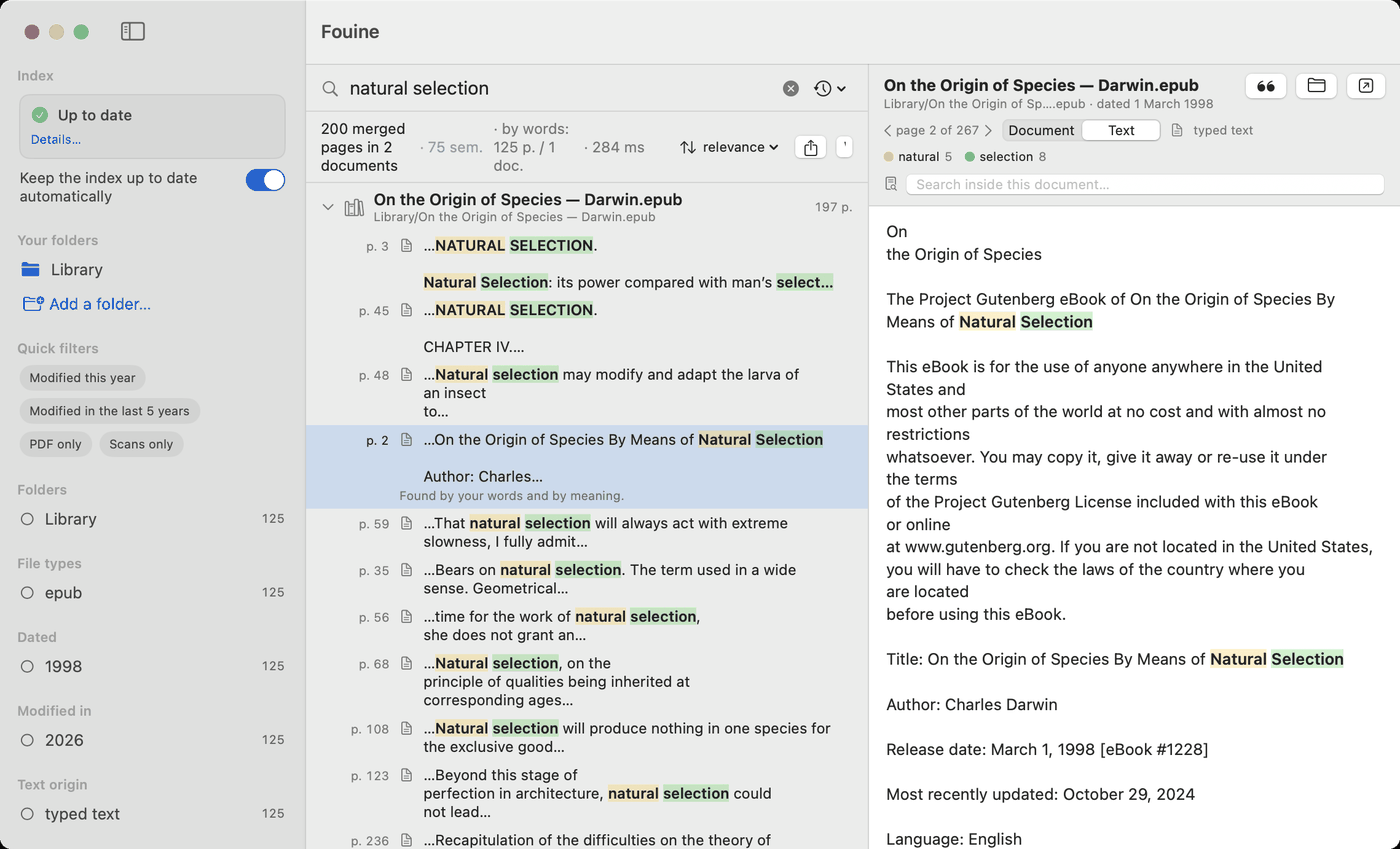
A search for “natural selection” in Darwin's “On the Origin of Species”, an EPUB of 267 pages. The results list pages 3, 45, 48, 2, 59, 35 and more; page 2 is selected and its text is shown on the right with the two words highlighted.
An EPUB of 267 pages. Fouine answers with page 2, and shows it.

Scanned pages become searchable

A photocopy holds no text, so Spotlight finds nothing in it. Fouine sends those pages through Apple's text recognition, on your Mac, and keeps the words in its own index. Your file is left alone: Fouine writes no text layer into it and never renames or moves it.

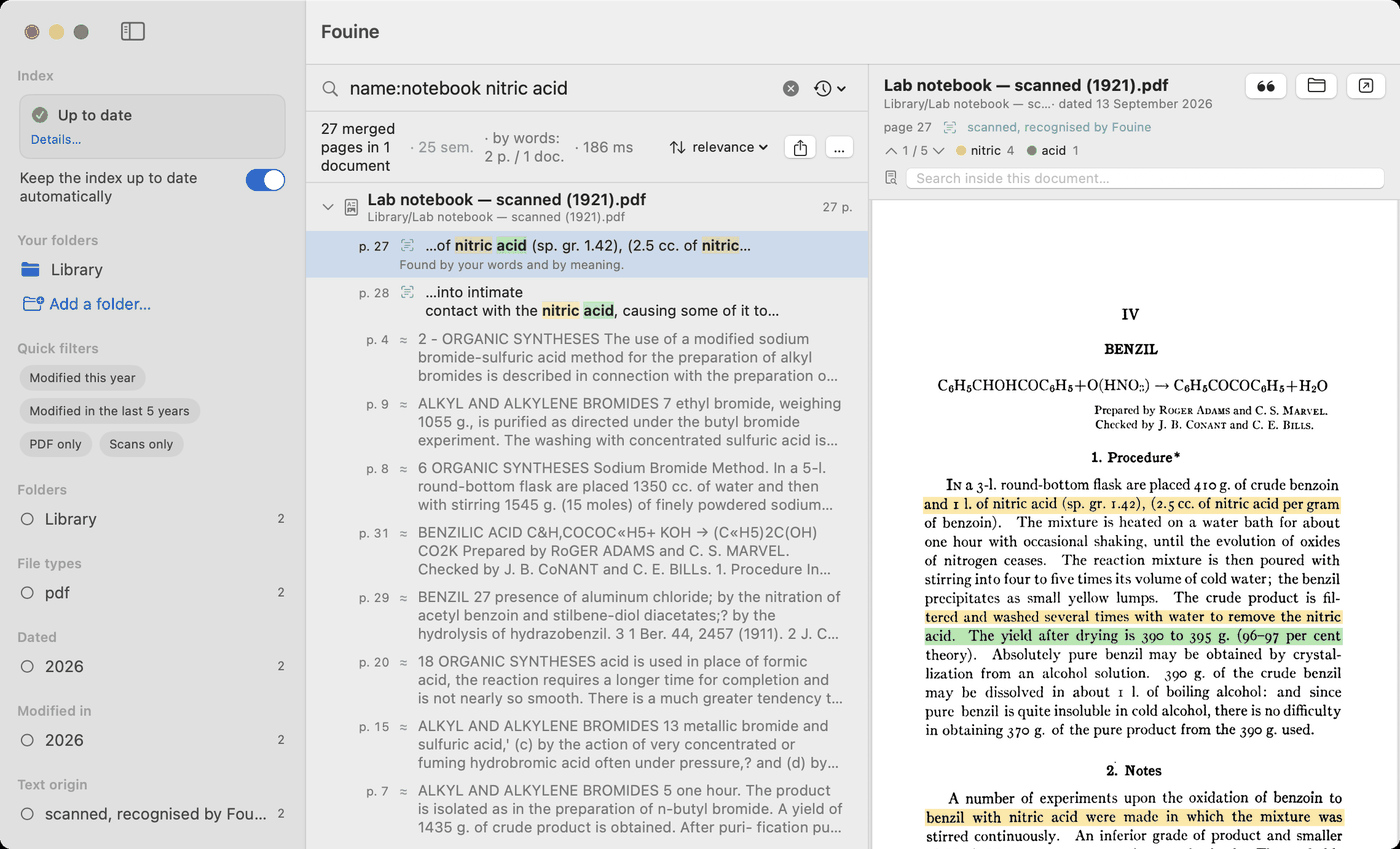
Each result says where its text came from, so you can tell a typed page from a recognised one.

A search for “name:notebook nitric acid” in a scanned PDF with no text layer. Under the document name, the label “scanned, recognised by Fouine”. On the right, the photographed page, with the highlight boxes drawn over the image of the words. In the sidebar, the Index card reads “Up to date”.
No text layer in this file. The highlights sit on the image of the page.

Everywhere else on the Mac

Fouine is a window. It is also a magnifying glass in the menu bar, a few lines in Spotlight, a command in the terminal, and a tool an assistant can call. The app, screen by screen.

  • Menu bar Click the little Fouine, type, and up to eight pages arrive while you are still typing.
  • Spotlight The documents Spotlight cannot read by itself (scans, DjVu, comics) turn up in its results anyway.
  • Shortcuts Three actions: search Fouine, open a page, get the text of a page.
  • Siri Say “search Fouine” and the search action opens.
  • Terminal The fouine command does what the app does, and prints JSON.
  • Apple Notes and Bear Tick a box in the settings and your notes become searchable too.
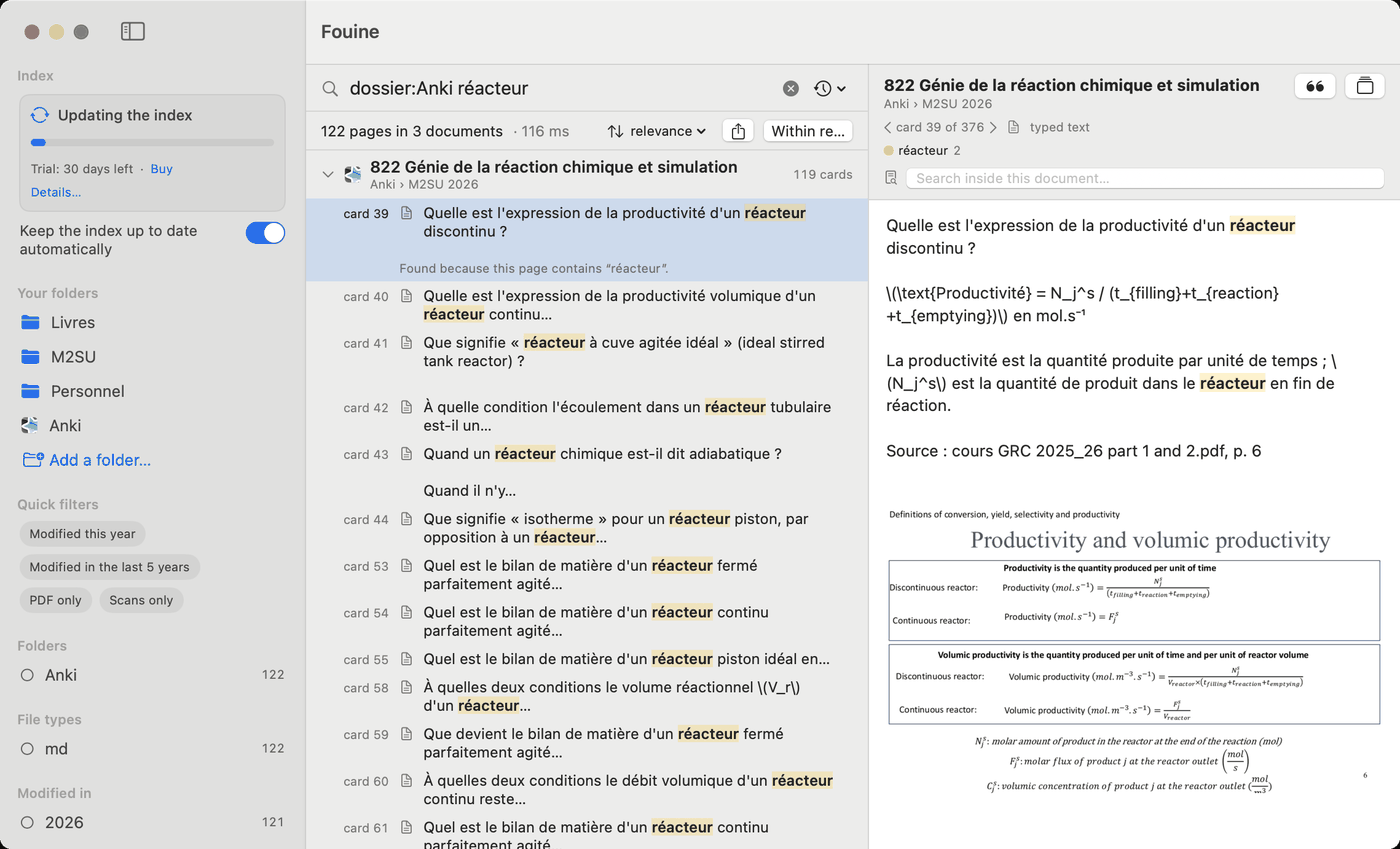
  • Anki Tick another box and your flashcards are searchable too, deck by deck, card by card. A card found opens in Anki.
Claude Codex / OpenAI Antigravity

Or let an assistant do the searching

Claude, Codex, Antigravity, Cursor, and any MCP assistant

Fouine includes a built-in MCP server (Model Context Protocol), the open standard that lets local assistants query tools on your Mac.

What changes on three ordinary questions:

  • “Which of my lab notebooks mention nitric acid, and at what concentration?” In the window, you would run the search, open the four pages found, and read them. The assistant runs the search, reads the four pages, and answers directly with the exact concentration and page citations.
  • “What do my course notes say about plug-flow reactors? Which pages should I reread?” The assistant tries several wordings (including ones you might not think of), reads the retrieved pages, and gives you a structured summary with page numbers.
  • “Do these two contracts say the same thing about the notice period?” The assistant finds the clause in each document, reads both pages, and compares them side by side, quoting each excerpt.

In my course notes, what is the difference between a plug-flow reactor and a continuous stirred-tank reactor? Cite the document and the page for each claim.

AGY
Antigravity

A CSTR assumes perfect mixing: the concentration is the same throughout the vessel and equal to the outlet concentration (Calcul de réacteurs chimiques.docx, page 6). A plug-flow reactor assumes no axial mixing, so the concentration changes continuously along the reactor (same document, pages 5 and 6). For the same final conversion the CSTR always needs the larger volume, especially at high conversion, but its yield and selectivity are often better (page 8). Several CSTRs in series behave more and more like a single plug-flow reactor (page 8).

A real exchange on the author's own course notes, with an assistant connected to Fouine: two searches, four pages read, every claim tied to a page you can open in one click.

Sourced answers, zero guesswork

Every answer explicitly cites the document name and page number the assistant consulted. Without Fouine, an assistant either hallucinates or tries to swallow entire files until its context window overflows. With it, the assistant looks up specific passages in your documents just like you would, only instantly and across thousands of pages.

Built for local privacy

The MCP server provides five read-only tools designed with strict privacy guards:

  • Strictly isolated: It cannot alter the index, trigger indexing jobs, or access your original files, and it opens no network connections of its own.
  • Transparent data flow: If your chosen assistant runs in the cloud, only the extracted text from the retrieved pages is transmitted, exactly as if you had manually pasted those excerpts into the chat. Nothing else ever leaves your Mac.

Set-up guide, written for your assistant →

See how the server works under the hood →

Fouine at work

Six kinds of people who keep a lot of documents, and what changes for each of them.

🎓 Students & Academics

  • The challenge: Losing hours hunting through 300-page lecture slides and reading packs just to find one definition before an exam.
  • The Fouine fix: Type an exam term and jump straight to the exact slide where the concept is introduced: highlighted in color, never dumped on page 1.
  • The study edge (AI + Anki): Let an AI assistant read your coursework through Fouine to generate Anki decks with built-in page citations. Because Fouine indexes your decks as well, a single query displays the flashcard alongside the original course slide.
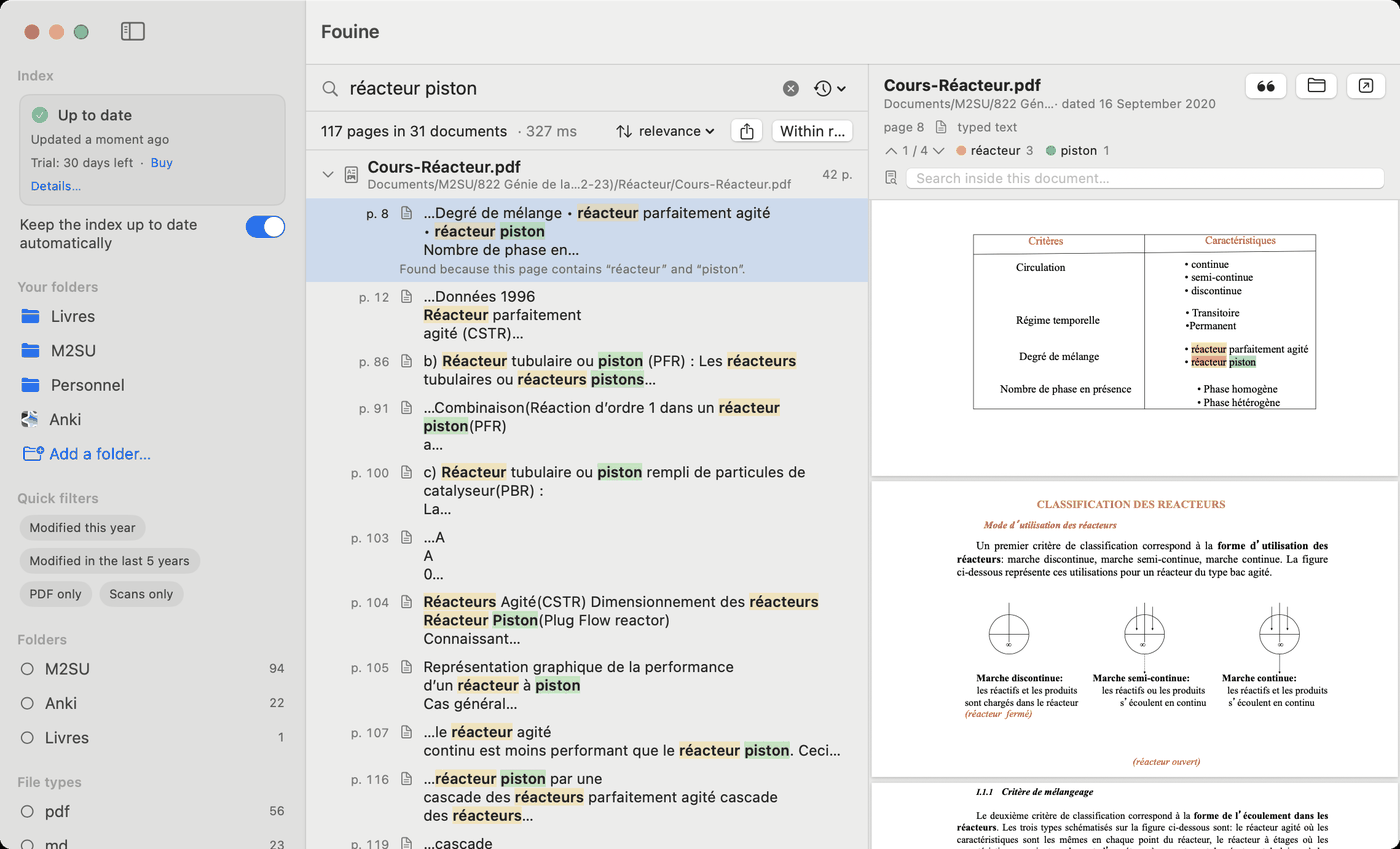
A search for “réacteur piston” in a chemical engineering course. 117 pages in 31 documents; page 8 of “Cours-Réacteur.pdf” is selected and shown on the right, a table with the two words highlighted. In the sidebar, the Anki source sits next to the folders.
The course: 42 pages, and the answer is page 8.
The same word searched in the Anki flashcards only. The deck “822 Génie de la réaction chimique et simulation” lists card 39, 40, 41 and more; card 39 is open on the right with its question, its answer, the page of the course it came from, and the slide as an image.
The deck: card 39 of 376, with the course page it was written from.

⚖️ Lawyers, Notaries & Contract Managers

  • The challenge: Locating a specific clause (notice period, liability cap, or price adjustment) buried inside dozens of scanned, countersigned PDFs.
  • The Fouine fix: Scanned agreements become fully searchable without touching or altering the original files. Enter a keyword, and the preview opens directly to the relevant clause.
  • Precision control: Restrict searches instantly with operators like name:"Contract 2024" or filter by date. You can also have an assistant compare clauses across two separate agreements with exact page citations.

📜 Historians, Genealogists & Archivists

  • The challenge: Digging through gigabytes of parish records, vintage newspapers, and historical scans where Spotlight turns up empty.
  • The Fouine fix: Apple's on-device OCR reads every scanned page once in the background. A family name typed once surfaces across all your archival folders.
  • Error-tolerant search: Built-in tolerance accounts for OCR misreads caused by faded ink or damaged paper. Even if an unusual surname is off by a letter, the record still appears.

🔬 Researchers & Engineers

  • The challenge: Cross-referencing papers, theses, lab notebooks, and datasheets across multiple projects without losing citations.
  • The Fouine fix: Every search result is tied to an exact page number ready for immediate citation, without wading through whole PDFs.
  • Assistant-powered synthesis: Ask an assistant to compare measurements or conclusions across three papers, and verify every figure on the cited page.

✍️ Writers & Journalists

  • The challenge: Sifting through hours of recorded interviews, meeting audio, and reference books to locate one quoted phrase.
  • The Fouine fix: On-device audio transcription turns recordings into searchable text directly on your Mac.
  • Instant playback: Searching for a remembered quote highlights the exact phrase and opens the audio playback at that very minute.

🏠 Personal & Family Archives

  • The challenge: Stacks of paper bills, administrative letters, warranties, and appliance manuals scattered across boxes or folders.
  • The Fouine fix: Scan them, drop them into a folder, and skip manual sorting entirely.
  • One search away: A reference number from a tax letter three years ago appears in seconds. No renaming, no tagging, no moving files.

More than a hundred formats

Office documents, books, e-mail, comics, subtitles, notebooks, flashcards, source code.

  • PDF
  • EPUB
  • DOCX
  • DOC
  • PPTX
  • XLSX
  • ODT
  • RTF
  • Pages
  • Numbers
  • Keynote
  • HTML
  • EML
  • MBOX
  • DjVu
  • Anki
  • Text
  • Markdown
  • CSV
  • LaTeX
  • JSON
  • Subtitles
  • Jupyter
  • CBZ
  • Python
  • Swift
  • Web archive
  • MP3
  • MP4
  • JPEG
  • PNG

Old .doc, .xls and .ppt files are read from their bytes, never from their extension, so a file that lost or changed its name still opens. Sound, video and images are read only once you switch them on in the settings. The full list is in the documentation.

How it compares

Six other ways to search a Mac, and what each of them does with a box of photocopies.

  Fouine Spotlight DEVONthink 4 HoudahSpot FoxTrot Fenn EagleFiler
Price €39 once With macOS $99 to $499, then $49 to $149 a year for updates $34 once About $120, not shown on the store $9 a month, or $249 once $69.99 once
Reads scanned pages by itself, without touching the file Yes No Yes, and files untouched since July 2026 No By hand, and it writes into the file Announced Reads Live Text only
Result opened at the page Yes No Partly No No Not documented No
Tolerates typos and OCR errors Yes Not claimed Not claimed Not claimed Not claimed Not claimed Not claimed
Search by meaning, on the Mac Yes macOS 27, Apple Silicon only Ranking yes, the chat goes online No No Yes No
No account, no cloud Yes Yes Index yes, assistant no Yes Yes Yes Yes
MCP server for assistants Yes, five tools No Yes, about sixty commands No No No No
Intel Macs, macOS 13 Yes macOS 26 yes, macOS 27 no Yes Yes Yes Apple Silicon only Yes
Source available Yes No No No No No No

Prices and facts as of September 2026, taken from each publisher's own site. “Not claimed” means the publisher does not advertise it, which is not the same as saying it cannot do it.

  • Fouine does not manage or sync your documents. It keeps no library of its own and adds no tags. It reads your folders where they already are.
  • Fouine does not edit them. The preview is read-only, and the text it recognises on a scan stays in its own index.
  • Fouine does not chat. Search by meaning compares pages; it writes no answers and summarises nothing.

Price

€39

Once. Updates for life. Up to 3 Macs.

Buy Fouine · €39

Or try it free for 30 days, with everything switched on.

Payment goes through Creem, our merchant. Your key arrives by e-mail straight after; paste it into Settings ▸ Licence. When the trial runs out, searching keeps working and only the index stops updating. Terms of sale and use.

The code is readable by anyone, under a source-available licence: you can read it, build it and change it for yourself. See the repository.

Questions people ask

Are my files modified?

No. Fouine reads your documents and writes nothing into them, not even the text it recognises on a scanned page, which lives in its own index. It moves, renames and deletes no file.

Do I need an account?

No. There is no account and no sign-in. You get a licence key by e-mail, you paste it once into the settings, and that is the whole ceremony.

What leaves my Mac?

Nothing while you index and nothing while you search. Four connections exist and you set off three of them yourself: downloading the 220 MB model for search by meaning, activating your licence key (your key and your Mac's name travel, nothing else), releasing that Mac later, and looking for an update, which is switched off to begin with. A continuous-integration test indexes deliberately booby-trapped documents while a local server listens, and requires zero connections. The privacy page says it all, and how to check it yourself.

What can it read?

More than a hundred kinds of file: office documents, books, e-mail, comics, subtitles, notebooks, source code, and scanned pages, whose text it recognises on your Mac. Sound, video and images are read only if you switch them on in the settings. DjVu files need djvulibre, which is the one thing macOS does not provide.

Does it read handwriting?

Apple's text recognition reads print. On handwritten notes it catches some of the words and misses others, so a search can come back empty on a page that does contain your word. Fouine counts those pages and tells you rather than keeping quiet.

How do I move to another Mac?

One key covers three Macs. If you need a fourth, open Settings ▸ Licence on a Mac you no longer use and release it; it stops counting, and you can activate it again later. Your Creem customer portal shows the same list.

How do I uninstall it?

From the Fouine ▸ Uninstall Fouine… menu. It stops the background updates, removes the terminal command, erases the index and offers to move the application to the Trash. Your documents are left exactly as they were.